---
title: "Announcing automated, zero-downtime migrations to Temporal Cloud"
description: "Easily migrate from self-hosted Temporal to Temporal Cloud with zero downtime. Fully automated, seamless, and built to minimize effort."
canonical: "https://temporal.io/blog/announcing-automated-migrations.md"
source: "https://temporal.io/blog/announcing-automated-migrations"
published: "2025-03-04"
authors:
- "Nikitha Suryadevara"
category: "Product News"
tags:
- "Cloud"
reading_time_minutes: 3
---
# Announcing automated, zero-downtime migrations to Temporal Cloud
We’re thrilled to announce the launch of our migration tooling that enables seamless transitions from self-hosted Temporal instances to Temporal Cloud, now in Pre-release. With this new tool, we aim to make the migration process as smooth and secure as possible while ensuring minimal disruption to your Workflows. This tooling will let you more easily take advantage of the [scalability](https://temporal.io/blog/higher-throughput-and-lower-latency-temporal-clouds-custom-persistence-layer.md), [performance](https://temporal.io/blog/benchmarking-latency-temporal-cloud-vs-self-hosted-temporal.md), and simplified operations that Temporal Cloud offers.
The migration tooling has been designed with the following objectives in mind:
- __Zero-downtime migrations__: Workflows, including long-running Workflows continue running during migration without downtime.
- __End-to-end automation__: Temporal handles the migration process using internal Workflows.
- __No changes to application code__: Your existing Workflows, signals, and queries will work without modification.
- __Minimal effort on your side__: Setup and coordination requirements are reduced, provided your self-hosted Temporal instance supports migration.
- __Full control and customization__: You decide when to initiate the migration, validate its success, and confirm or abort the process before completion.
It’s important to note that this tooling currently supports migrations from self-hosted Temporal to Temporal Cloud only. Reverse migrations (from Cloud back to self-hosted) are planned in our roadmap!
## How It Works
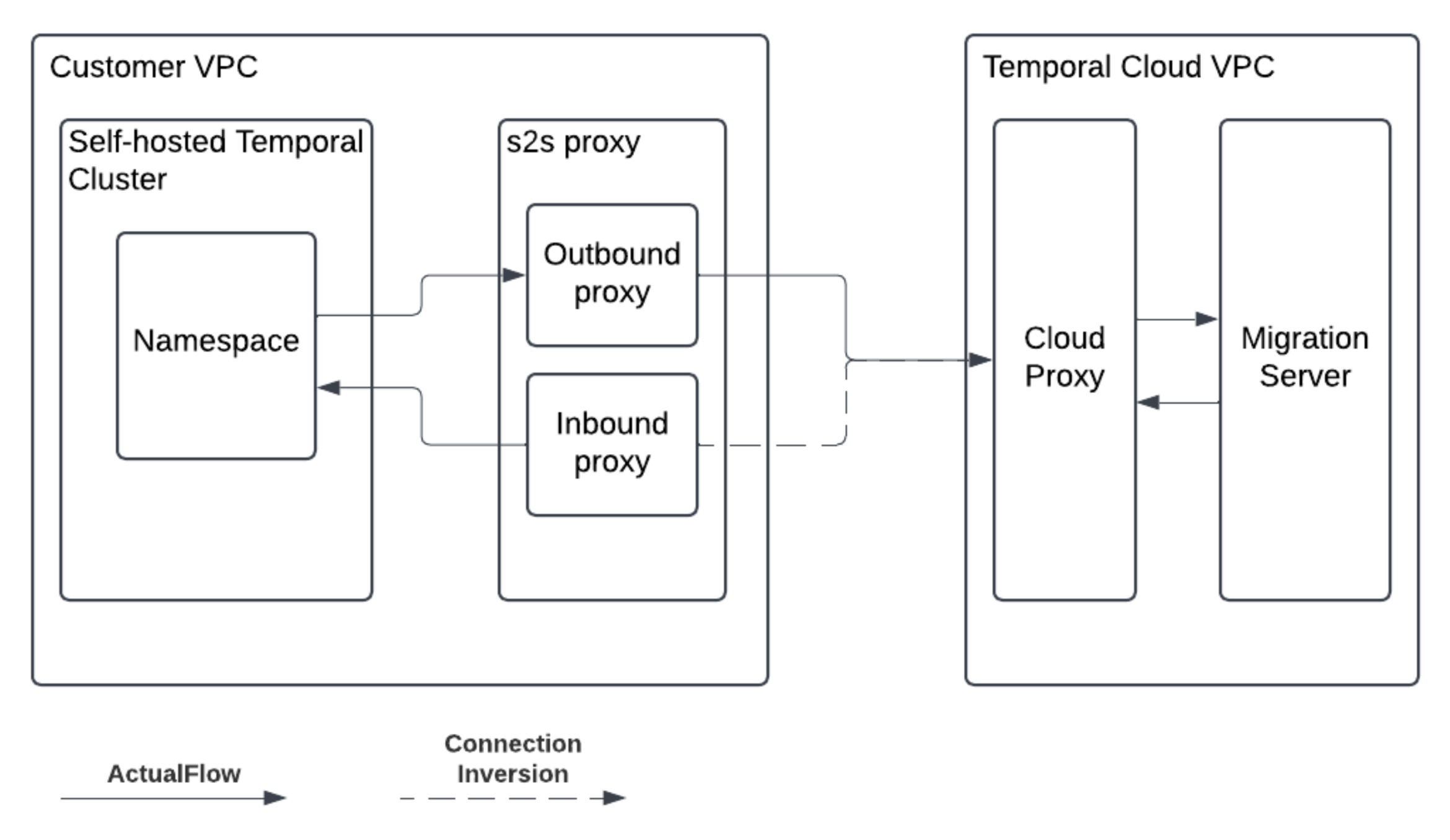
### Migration Server
A Temporal Service (aka Server) facilitates secure connections between your self-hosted instance and Temporal Cloud. It acts as the backbone of the migration process.
### Migration Proxy
To enhance security, [proxies](https://github.com/temporalio/s2s-proxy) are introduced between your self-hosted server and the migration server:
Customer-side proxy: Installed on your infrastructure for secure communication.
Cloud-side proxy: Managed by Temporal Cloud.
### A step-by-step guide to migration
Here’s how the migration process will work:
1. Preparation Phase
- Temporal coordinates with you to set up a migration server, which may take several hours.
- You install a migration proxy to establish secure connections between your self-hosted instance and the migration server.
2. Initiating Migration
- Use the `StartMigrationRequest` API to specify namespaces for migration along with endpoint details.
- A corresponding namespace is created in Temporal Cloud with a “non-active” status. You can configure permissions and access controls during this phase.
3. Monitoring Progress
- The `GetMigrationResponse` API allows you to track replication progress, including workflows replicated, remaining workflows, and estimated time for completion.
4. Validation and Handover
- Once replication is complete, you can use the `HandoverNamespaceRequest` API to switch traffic between your source namespace (self-hosted) and target namespace (cloud).
- This gives you time to validate that everything is functioning correctly in Temporal Cloud by switching worker traffic and workflow starters incrementally.
5. Finalizing or Aborting Migration
- After validation, use `ConfirmMigrationRequest` API to finalize the migration.
- If issues arise (e.g., incorrect namespace migrated or replication errors), you can abort using `AbortMigrationRequest` API. Aborting will roll back changes without impacting your workflows.
These APIs provide granular control over every step of the process, ensuring transparency and flexibility.
## Pre-requisites and limitations at Pre-release
Refer to this [document](https://docs.google.com/document/d/1IkXszzZii07qQOs9LPY0qhzO_A4W-r07u4RyuL1qzPs/edit?tab=t.0 "Pre-requisites & limitations") for pre-requisites and limitations of using this migration tool.
## Conclusion
With this new migration tooling, migrating from self-hosted Temporal to Temporal Cloud has never been easier. By automating complex processes and minimizing customer effort, we’re empowering you to focus on building resilient applications while we handle the heavy lifting of infrastructure management.
Ready to migrate to Temporal Cloud? [Contact us](https://forms.gle/qobtUpZG2SVEe7gi6) today to get started!